Jupyter Notebook Markdown Cheat Sheet
Master Jupyter Notebook Markdown syntax with this comprehensive cheat sheet. Learn LaTeX math formulas, code blocks, tables, MyST extensions, and advanced formatting techniques for data science documentation. Perfect for Python developers, data scientists, and researchers working with Jupyter notebooks.
Quick Syntax Search
Basic Jupyter Notebook Markdown Syntax
Headers
# Heading Level 1
## Heading Level 2
### Heading Level 3
#### Heading Level 4
##### Heading Level 5
###### Heading Level 6
Heading Level 2
Heading Level 3
Heading Level 4
Heading Level 5
Heading Level 6
Text Emphasis
*italic text* or _italic text_
**bold text** or __bold text__
***bold italic*** or ___bold italic___
~~strikethrough~~
`inline code`
italic text or italic text
bold text or bold text
bold italic or bold italic
strikethrough
inline code
Lists
# Unordered list
- Item 1
- Item 2
  - Sub-item 2.1
  - Sub-item 2.2

# Ordered list
1. First item
2. Second item
   1. Sub-item 2.1
   2. Sub-item 2.2
Unordered list:
- Item 1
- Item 2
- Sub-item 2.1
- Sub-item 2.2
Ordered list:
- First item
- Second item
- Sub-item 2.1
- Sub-item 2.2
Links & Images
# Links
[Link text](http://example.com)
[Link with title](http://example.com "Link title")
# Images


# Reference-style links
[Link text][1]
[1]: http://example.comJupyter Notebook LaTeX Math & Code Blocks
Mathematical Formulas
# Inline math formula
$E = mc^2$

# Block math formula
$$
\int_{-\infty}^{\infty} e^{-x^2} dx = \sqrt{\pi}
$$

# Complex math expression
$$
f(x) = \begin{cases}
x^2 & \text{if } x \geq 0 \\
-x^2 & \text{if } x < 0
\end{cases}
$$
Inline math formula:
Einstein's famous equation: E = mc²
Block math formula:
Gaussian integral
Complex math expression:
Piecewise function
Common math symbols:
Greek letters
Operators
Relations
Code Blocks
# Python code block
```python
def hello_world():
    print("Hello, World!")
    return True
```

# Code block with line numbers
```python {.line-numbers}
import numpy as np
import matplotlib.pyplot as plt

x = np.linspace(0, 2*np.pi, 100)
y = np.sin(x)
plt.plot(x, y)
```
Python code block:
def hello_world():
    print("Hello, World!")
    return True
Code block with syntax highlighting:
import numpy as np
import matplotlib.pyplot as plt

x = np.linspace(0, 2*np.pi, 100)
y = np.sin(x)
plt.plot(x, y)
MyST Markdown Extensions for Jupyter
Admonitions
```{note}
This is a note box
```

```{warning}
This is a warning box
```

```{tip}
This is a tip box
```

```{important}
This is an important box
```Cross References
# Label definition
(my-label)=
## My Section

# Reference labels
{ref}`my-label`
{ref}`Custom text <my-label>`

# Reference figures
{numref}`figure-{number}`
{ref}`Figure caption <my-figure>`Figures & Tables
# Figure
```{figure} ./images/example.png
:name: my-figure
:width: 300px

Figure caption text
```

# Table
```{list-table} Table title
:header-rows: 1
:name: my-table

* - Column 1
  - Column 2
* - Row 1 Col 1
  - Row 1 Col 2
* - Row 2 Col 1
  - Row 2 Col 2
```
Figure:
Table title:
| Column 1 | Column 2 |
|---|---|
| Row 1 Col 1 | Row 1 Col 2 |
| Row 2 Col 1 | Row 2 Col 2 |
Advanced Jupyter Markdown Features
HTML Blocks
# Colored alert boxes

Tip: Use blue boxes for tips and information


Warning: Use yellow boxes for warnings


Success: Use green boxes for success messages


Danger: Use red boxes for danger warnings
Internal Links
# Link to section
[Section Title](#section-title)

# Section link with ID
<a id="section_ID"></a>
[Section Title](#section_ID)

# Link to other page
[Other Page](other-page.md)
Section links:
External page link:
Other PageSpecial Characters
# Geometric shapes
→ (→)
← (←)
↑ (↑)
↓ (↓)
★ (★)
☆ (☆)
♠ (♠)
♣ (♣)
♥ (♥)
♦ (♦)

# Mathematical symbols
≤ (≤)
≥ (≥)
≠ (≠)
∞ (∞)
∑ (∑)
∏ (∏)
√ (√)
Geometric shapes:
Mathematical symbols:
Line Breaks
# Force line break
This is the first line

This is the second line

# Horizontal rules
***
---
___
Force line break:
This is the second line
Horizontal rules:
Jupyter Notebook Markdown Tables
Basic Table
| Header1 | Header2 | Header3 |
|---------|---------|---------|
| Row1Col1 | Row1Col2 | Row1Col3 |
| Row2Col1 | Row2Col2 | Row2Col3 || Header1 | Header2 | Header3 |
|---|---|---|
| Row1Col1 | Row1Col2 | Row1Col3 |
| Row2Col1 | Row2Col2 | Row2Col3 |
Aligned Table
| Left Align | Center Align | Right Align |
|:-----------|:------------:|------------:|
| Left       | Center       | Right       |
| Content | Content | Content || Left Align | Center Align | Right Align |
|---|---|---|
| Left | Center | Right |
| Content | Content | Content |
Jupyter Notebook Markdown Quick Reference
Jupyter Markdown Syntax, Math, and MyST Extensions
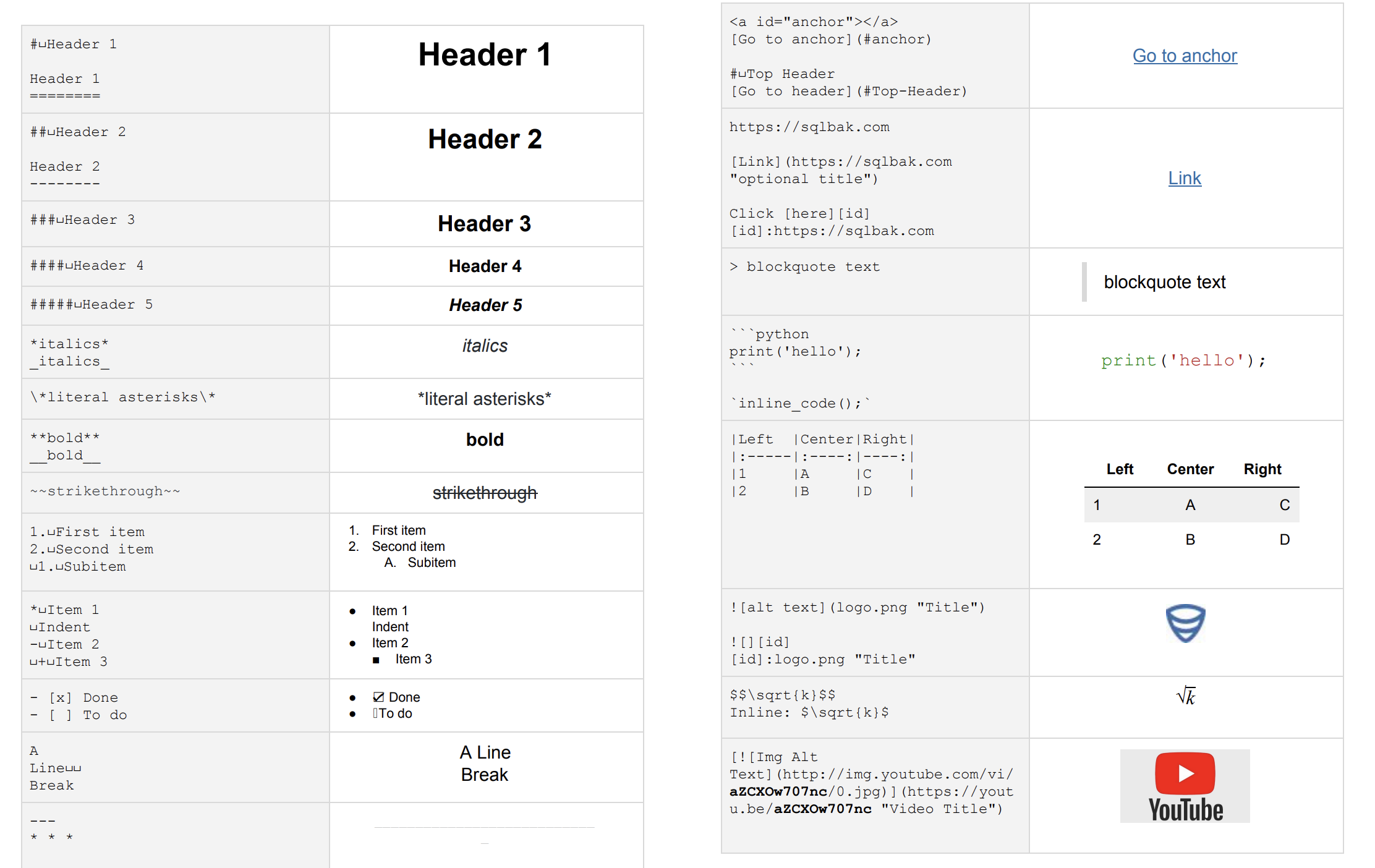
Jupyter Notebook Markdown syntax overview
Use LaTeX syntax with inline formulas surrounded by $...$ and block formulas by $$...$$. Jupyter automatically renders math formulas using MathJax.
Ensure proper table format: each row must have the same number of columns, and there must be a separator row (|---|---|---) between header and data rows.
Use three backticks ``` to surround code. You can specify a language for syntax highlighting, for example ```python.
MyST Markdown is an extension of Markdown that supports additional features like cross-references, admonitions, directives, etc., primarily used for technical documentation and academic publishing.
Related Tools
Useful tools selected for this workflow

Git Cheat Sheet
A cheat sheet for Git commands.

Mac Address Lookup
Lookup the vendor and manufacturer of a device by its MAC address.

Basic Auth Generator
Generate basic authentication credentials for HTTP requests.

Benchmark Builder
Build and run benchmarks for your code.

Chmod Calculator
Calculate file permissions based on octal, symbolic, and decimal formats.

Crontab Generator
Generate crontab expressions for scheduling tasks.